What is SRT Format?
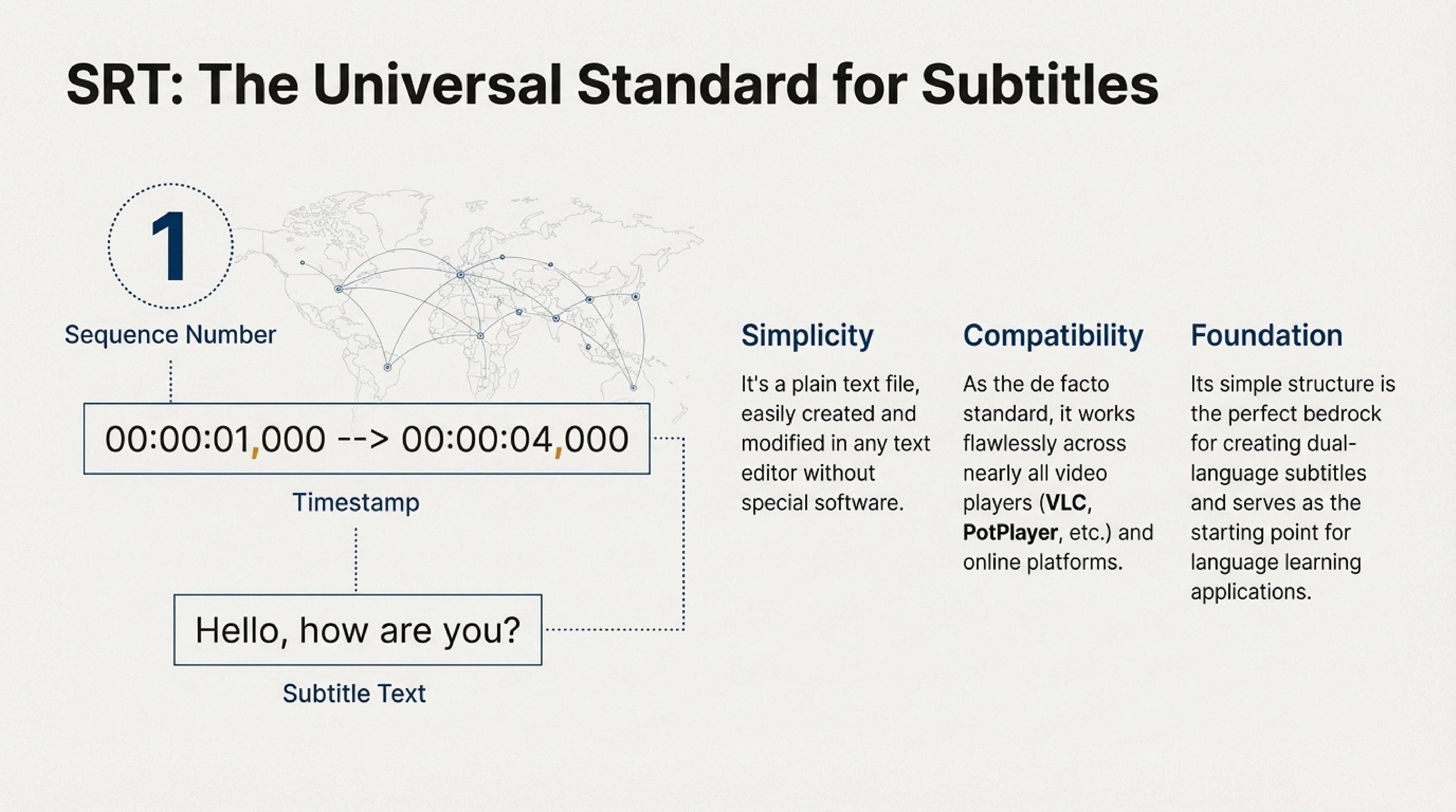
SRT is a text-based subtitle format used to synchronize text with video. It's simple to use and supported by most video players, such as VLC and Windows Media Player, as well as various online platforms.
An SRT file consists of several parts:
- Subtitle number — for easy navigation through the file.
- Display time — when the subtitle should appear and disappear on screen.
- Subtitle text — the actual text that the viewer sees.
Example of an SRT file:
In this example, you can see that each subtitle has its own number, start and end timestamps, and the text itself. The SRT format uses a simple structure, making it easy to read and edit.
To edit text and timings without installing software, use DualSubs’ online SRT editor (processing happens in your browser). For a short walkthrough, see How to edit SRT subtitles.
Why is SRT So Popular?
The SRT format has gained widespread popularity due to several key advantages:
- Simplicity: The SRT format consists of text files that are easy to edit in any text editor. You don't need special software to create or modify subtitles.
- Wide support: Almost all video players and online services support this format. Whether it's VLC, Windows Media Player, PotPlayer, or platforms like YouTube — SRT works everywhere.
- Easy synchronization: You can precisely adjust the text display timing, which is important for proper synchronization with video. This is especially useful when creating subtitles for movies and TV series.
- Versatility: SRT can be easily converted to other subtitle formats, such as VTT, ASS, SSA, or TTML, and vice versa.
Interesting fact: The name SRT comes from the SubRip program, which was one of the first programs for extracting subtitles from DVDs. Today, the SRT format has become the de facto standard for text-based subtitles.
How to Use SRT Format for Merging and Converting Subtitles?
Merging Subtitles
A subtitle merging service allows you to combine multiple subtitles into one SRT file, creating, for example, dual subtitles for a single video. This is useful if you need subtitles in multiple languages to be displayed simultaneously on screen.
For example, you can merge English and Russian subtitles into one SRT file to see the original text and translation at the same time. This is especially effective for language learning, as you hear the original speech, see the original text, and immediately get the translation.
Converting to SRT Format
Converting to SRT format allows you to convert subtitles from other formats, such as VTT or ASS, into the universal SRT. This is especially convenient if you want your subtitles to work on most devices and video platforms.
Many modern services work with various subtitle formats, but SRT remains the most reliable and compatible option. If you have subtitles in VTT (WebVTT), ASS (Advanced SubStation Alpha), or other formats, they can be easily converted to SRT for maximum compatibility.
Advantages of Using SRT for Language Learning
The SRT format is especially popular among those learning foreign languages due to the following advantages:
- Dual subtitles: You can create an SRT file with dual subtitles (for example, English and Russian), which significantly simplifies content comprehension.
- Easy editing: If you want to add explanations or correct translations, you can edit the SRT text file or use the in-browser SRT editor.
- Synchronization: Precise synchronization of text with video helps you better understand pronunciation and intonation.
- Compatibility: SRT works with all popular video players, so you can use it on any device.
How to Open an SRT File
Many users search for how to open an SRT file because they expect it to behave like a media file. In reality, an SRT file is a plain text subtitle file, so you can open it in several ways depending on your goal.
Open SRT as text
If you want to inspect or edit the subtitle content, open the SRT file in any text editor such as Notepad, Notepad++, or VS Code. Inside, you will see subtitle numbers, timestamps, and the subtitle lines themselves. For list-based edits without installing apps, try the online editor; see also how to edit SRT.
Open SRT with video
If you want to use subtitles during playback, load the SRT file together with your video in a media player. Usually this is done through an Add Subtitle menu item or by dragging the file into the player window. This works in VLC, PotPlayer, MPC-HC, and many other players.
Open SRT in Subtitle Edit
Subtitle Edit is a free, open-source subtitle editor. You can open an SRT file in it, edit text and timestamps, sync subtitles with video, convert to other formats, and extract subtitles from video. The program runs on Windows, macOS, and Linux.
You can download Subtitle Edit from the releases page: GitHub — Subtitle Edit (releases). The Windows installer and portable builds for different platforms are available there. For a step-by-step guide on syncing subtitles with video (including shifting in Subtitle Edit), see our article How to sync subtitles with video.
If the SRT file does not display correctly, check the encoding. In most cases, UTF-8 is the best option.
How to Create an SRT File
Users also search for how to create an SRT file when they want to make subtitles from scratch or manually fix an existing subtitle track. The good news is that you can create an SRT file without any special subtitle software.
- Create a plain text file.
- Add the number of the first subtitle entry.
- Write the start and end time in the format hours:minutes:seconds,milliseconds.
- Add the subtitle text below it.
- Leave an empty line and continue with the next subtitle entry.
- Save the file with the .srt extension, ideally using UTF-8 encoding.
Simple SRT file template
This simple structure is exactly why the SRT format remains so popular. You can create the file manually, then open it in a media player or subtitle editor and refine the timing later. To quickly edit an existing .srt in the browser, use DualSubs’ online SRT editor.
Conclusion
The SRT format is a simple and convenient way to add subtitles to your video. Thanks to its simplicity, wide support, and versatility, SRT has become the standard for working with text-based subtitles.
With the help of a subtitle merging service and conversion to SRT, you can easily configure and combine subtitles for better content comprehension. Whether you're learning languages, creating content, or simply want to add subtitles to a video, the SRT format is a reliable and proven choice.